

The best features of SVM
Simple Vulnerability Manager is the perfect tool for any cybersecurity analyst: in just a couple of clicks you can generate vulnerability reports covering every URL or IP address loaded into the project, each one with a description, an impact assessment and a possible fix.
It ships with a database covering the vast majority of vulnerabilities a system can be exposed to, organised into Web Scanners, Service Scanners, Static Scanners and Mobile. Inside each section, next to the relevant vulnerability, you will find a short description of what causes the problem, the impact it has on the system and the steps to remediate it.
DownloadProjects
Projects hold a name, URL addresses, IP addresses, the pentester’s name, the person who requested the assessment and the vulnerabilities found. You can also add 6 types of dates depending on the project status.
Reports
Reports are generated with Microsoft Word from a template where you can customise the font, the table colours and pick from 9 statistical charts.
Scanners
With a single click you can run external tools such as Qualys, Nessus, Nmap, Acunetix, Netsparker, Burp Suite, OpenVAS, Recon-NG, EyeWitness and many more. Every tool can be customised by editing its .bat file.
Mobile (Android)
Run external tools such as Apktool, Enjarify, MobSF, Qark and more with one click to analyse Android apps, detect vulnerabilities and add them straight to your project report.
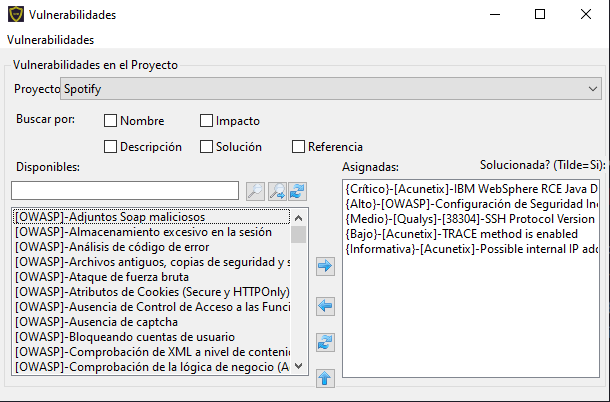
Vulnerability knowledge base
You get an extensive list of vulnerabilities sourced from the leading scanners — Qualys, Nessus, OpenVAS, Acunetix, Netsparker, IBM AppScan and Nikto. You can also create your own vulnerabilities whenever you need to.
Download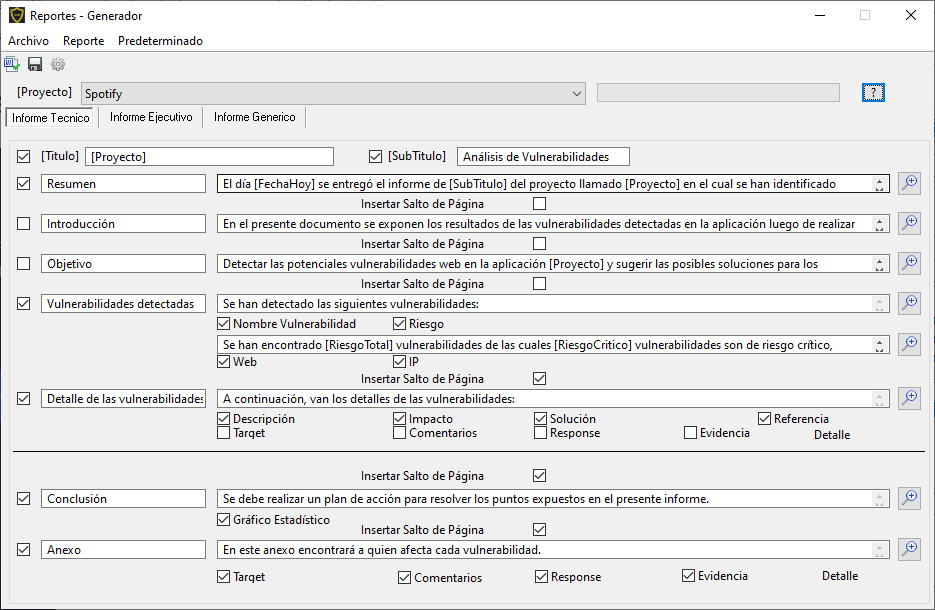
Create up to 3 different report types
Customise the text in each of the 7 sections of the 3 report types (Technical Report, Executive Report and Generic Report) that you can create in Microsoft Word, then edit them or deliver them as PDF.
Download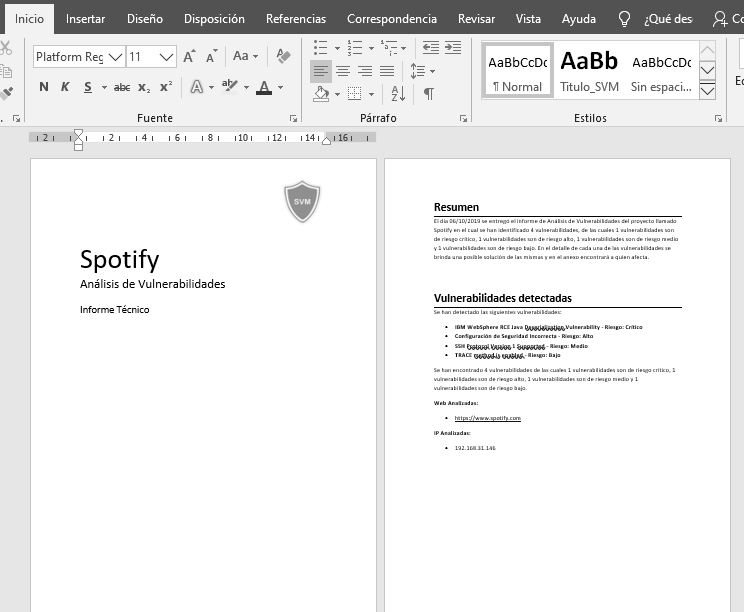
Vulnerability report example
Each of the 3 report types has fully customisable text, and you can edit the report or export it to PDF with Microsoft Word.
+700
Available vulnerabilities
3 languages
The interface is translated into Spanish, English and Russian
What people who use it say
A few opinions about SVM

Diego Bruno
Pentester
I found in SVM the ideal tool to unify every tool I work with daily into a single program. Powerful, simple and effective. I recommend using it.
BlackMantiSecurity
Maximiliano Soler
Pentester
SVM is a very valuable tool; its features let us save time generating reports. On top of being free, it is updated frequently, and its features meet the needs we were looking for.
ArtsSEC
Emanuel Andrés Párraga
Pentester
We found in SVM the right solution to our problems. This tool addresses two major needs inside companies and cybersecurity teams: improving vulnerability management and optimising time. The team’s productivity has increased noticeably and in an organised way.
YappóFrequently asked questions
Everything you need to know about Simple Vulnerability Manager
What is Simple Vulnerability Manager?
Simple Vulnerability Manager (SVM) is a free vulnerability management program for cybersecurity analysts. It lets you load projects with URL and IP addresses, run external scanning tools and generate vulnerability reports in Microsoft Word in just a few clicks.
Is Simple Vulnerability Manager free?
Yes. SVM is completely free and updated frequently. You can download it from the project’s releases section on GitHub.
Which operating system does SVM run on?
SVM runs on Windows and generates its reports with Microsoft Word, so you can edit them afterwards or export them to PDF.
Which scanning tools can I run from SVM?
With one click you can launch external tools such as Qualys, Nessus, Nmap, Acunetix, Netsparker, Burp Suite, OpenVAS, Recon-NG and EyeWitness, among many others. For Android analysis you can run Apktool, Enjarify, MobSF and Qark. Tools are customised by editing their corresponding .bat file.
How many vulnerabilities does the knowledge base include?
The knowledge base includes more than 700 vulnerabilities coming from the main scanners such as Qualys, Nessus, OpenVAS, Acunetix, Netsparker, IBM AppScan and Nikto. You can also create your own vulnerabilities.
What types of vulnerability reports does SVM generate?
SVM generates 3 types of reports in Microsoft Word: Technical Report, Executive Report and Generic Report. Each one has 7 sections of customisable text, fonts, table colours and 9 statistical charts to choose from.
Which languages is SVM available in?
The Simple Vulnerability Manager interface is translated into Spanish, English and Russian.
Where can I download Simple Vulnerability Manager?
You can download the latest version from the releases page on GitHub: https://github.com/simplevulnerabilitymanager/svm/releases/
Contact us on WhatsApp
Fill in the form and we will reply on WhatsApp shortly.
